
Plan meals with ChatGPT or Claude, and tick off the list on your phone
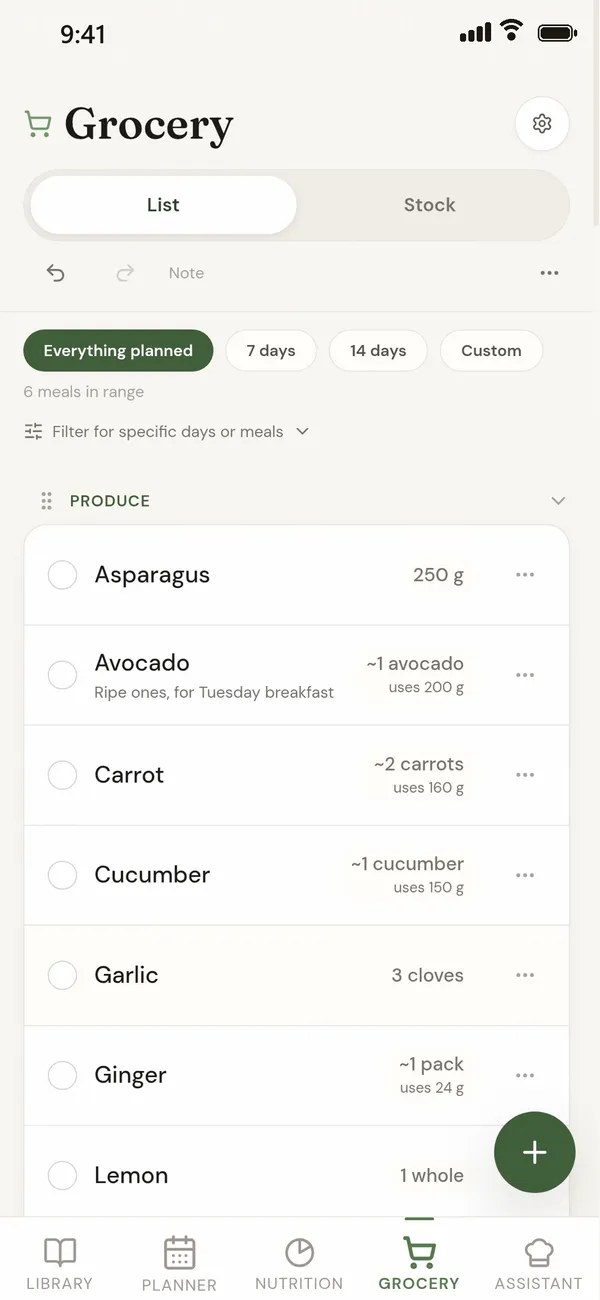
Connect your assistant to a quiet counter, a meal planner for the web and Android. You keep planning in the chat; the assistant saves the recipes and puts them on your week in the app, the app builds the grocery list from them, and you tick items off on your phone in the shop.
The connection is part of a quiet counter plus (USD 49.99 a year). It works with Claude and with ChatGPT's custom connectors, using the address https://agents.aquietcounter.com/mcp.
Why not keep everything in the assistant?
An assistant is good at ideas and at following a long request. It is less good at sums, and a chat forgets. Connected to a quiet counter, the assistant does the talking and the app keeps the record and does the arithmetic.
- The app does the maths. Grocery amounts are added up by the app from the recipes on your plan, with the same code the app uses for its own list. Calories and macros are worked out by the app too. The assistant reads those figures back; it does not invent them.
- The list matches the plan. Every line on the grocery list comes from a planned meal or from something added by hand, and you can open a line to see which meals it is for. Take a meal off the plan and its ingredients go with it. Pantry staples such as salt and oil sit in their own section, "Pantry staples you likely have", rather than vanishing.
- Nutrition from an ingredient database. A recipe's calories, protein, carbs and fat come from the app's own ingredient records, the same figures you see in the app. When an ingredient cannot be counted, the app says which one rather than guessing.
- Your recipes are kept. Every recipe the assistant saves goes into your library in the app. Next time you can put a favourite on the plan yourself, or switch on Recommendations and let the planner suggest meals from your library, with no chat at all.
- A good week can come back. In the Planner's day menu, Repeat week copies this week's meals to next week: on the same days, shuffled, or only the days you pick. Save week as template and Save day as template keep a week or a day under a name, and Load template puts it on the plan again from any start day.
- Shared with your household. With a shared household, the plan, the recipes and the list are the same on every phone, and an item ticked in the shop is ticked for everyone. The assistant works inside that shared plan as you.
- Who is eating, and how much. Each planned meal records who is eating it and each person's portion, so a dinner for "just me and Billy" counts for the two of you and nobody else.
- Leftovers and the freezer. A leftover planned from a dinner adds nothing to the list, because the dinner's batch covers it. A cooked dish in your freezer can go on the plan as a meal, and the list marks things you already have frozen. Fridge and pantry items are not taken off the list.
- Changes can be taken back. When the assistant takes a meal off the plan, removes a list item, edits a recipe, or changes your stock or your targets, it can undo that for fifteen minutes. Anything it adds, you can remove in the app.
What can the assistant do once it is connected?
Only what you approve on the sign-in page. The permissions are:
- Read your saved recipes, your meal plan, your kitchen stock and your grocery list.
- Save new recipes to your library, either a recipe it has written out or the address of a recipe page, which our server reads.
- Schedule, move and remove meals on your plan, and say who in the household is eating each one.
- Add and remove items on your grocery list, and tick them off.
- Read your nutrition figures, log meals you have eaten, and set calorie and macro targets.
It never receives your email address, password or payment details. You can see every connection and disconnect it in the app under Profile, Connected apps.
How do I connect Claude?
- Make an account at app.aquietcounter.com or in the Android app, and turn on a quiet counter plus.
- In Claude on the web or the desktop app, open Customize, then Connectors. Choose Add, then Add custom connector.
- Name it "a quiet counter" and enter
https://agents.aquietcounter.com/mcp. - A page from a quiet counter opens. Sign in, read the list of permissions, and approve.
- In a chat, open the + menu, choose Connectors and switch a quiet counter on.
Anthropic's own instructions are in its help article on custom connectors. On Claude's free plan you can add one custom connector.
How do I connect ChatGPT?
- Have a quiet counter plus, as above.
- In ChatGPT on the web, open Settings, then Apps (called Apps and Connectors on some accounts), then Advanced settings, and turn on Developer mode.
- Back in Apps, choose Create. Name it "a quiet counter", enter
https://agents.aquietcounter.com/mcp, and choose OAuth for sign-in. - Sign in on the a quiet counter page that opens, and approve.
- In a chat, choose the connector from the tools menu.
OpenAI offers custom connectors on paid ChatGPT plans, and moves these menus from time to time. If a label differs, OpenAI's developer documentation has the current path.
What can I ask it?
- "Plan five dinners for this week from my saved recipes. Nothing with mushrooms."
- "Save this recipe and put it on Thursday for me and Billy."
- "What is on the grocery list for the weekend shop?"
- "Add bin bags and dishwasher tablets to the list."
- "We are out on Friday. Move that dinner to Saturday."
Longer requests it can carry out
The assistant can chain several steps in one go: read, decide, then write to the app. Each of these uses only what the connection can do.
- "Check my macro targets and what I already have planned for Thursday. Find a dinner in my library that uses what is in my stock and fits what is left, then put it on Thursday."
- "Suggest a wine for each course of Friday's dinner party and add them to the grocery list."
- "Plan four dinners next week for me and Sam from my library, nothing over 40 minutes. Give Sam a portion and a half."
- "Look in my freezer and plan next week around it. Use the frozen dishes first."
- "Use chicken thighs instead of salmon in Wednesday's dinner, just this week, and tell me what changed on the list."
- "Saturday's lasagne makes eight. Put the leftovers on my lunches on Monday and Tuesday."
- "Log what I ate today: porridge with a banana for breakfast, and half a portion of last night's lasagne for lunch."
- "What is in season this month? Find three recipes in my library that use it and put them on next week."
- "Go through this week's list against my stock, ask me about anything I might already have, and tick off what I confirm."
- "Save this recipe from its link, fix any ingredient that did not match, and put it on Sunday for the whole household."
Questions
Why connect an assistant instead of planning in the chat?
Because the app keeps the record and does the sums. The grocery list is added up from the meals on your plan, nutrition comes from the app's ingredient database, your recipes stay in your library, and the plan and list are shared with your household. The assistant reads those figures rather than working them out itself.
Can ChatGPT or Claude make a grocery list I can tick off on my phone?
Yes, if you connect it to a quiet counter. The assistant puts meals on your plan, the app builds the grocery list from them, and you tick items off in the a quiet counter app on Android or in any phone browser.
Do I need to pay for the connection?
Yes. Connecting an assistant is part of a quiet counter plus, which costs USD 49.99 a year or USD 5.20 a month. Your assistant may also need a plan that allows custom connectors.
Which assistants work with a quiet counter?
Any assistant that can add a remote connector using the Model Context Protocol and OAuth sign-in. Claude and ChatGPT both can. The address is https://agents.aquietcounter.com/mcp.
Can I still change the plan myself?
Yes. Everything the assistant does appears in the app, and you can move, remove or add meals and items there as usual.
Will my partner see the list?
If you share a household in a quiet counter, yes. The assistant acts as you inside the shared plan, so your partner sees the same meals and the same grocery list on their phone.
How do I stop the assistant using my account?
Open the app, go to Profile, then Connected apps, and choose Disconnect. It stops working within a minute.
Related guides
Last checked 9 October 2026. If something here is wrong, tell us at [email protected].