
A shared grocery list that builds itself from the meal plan
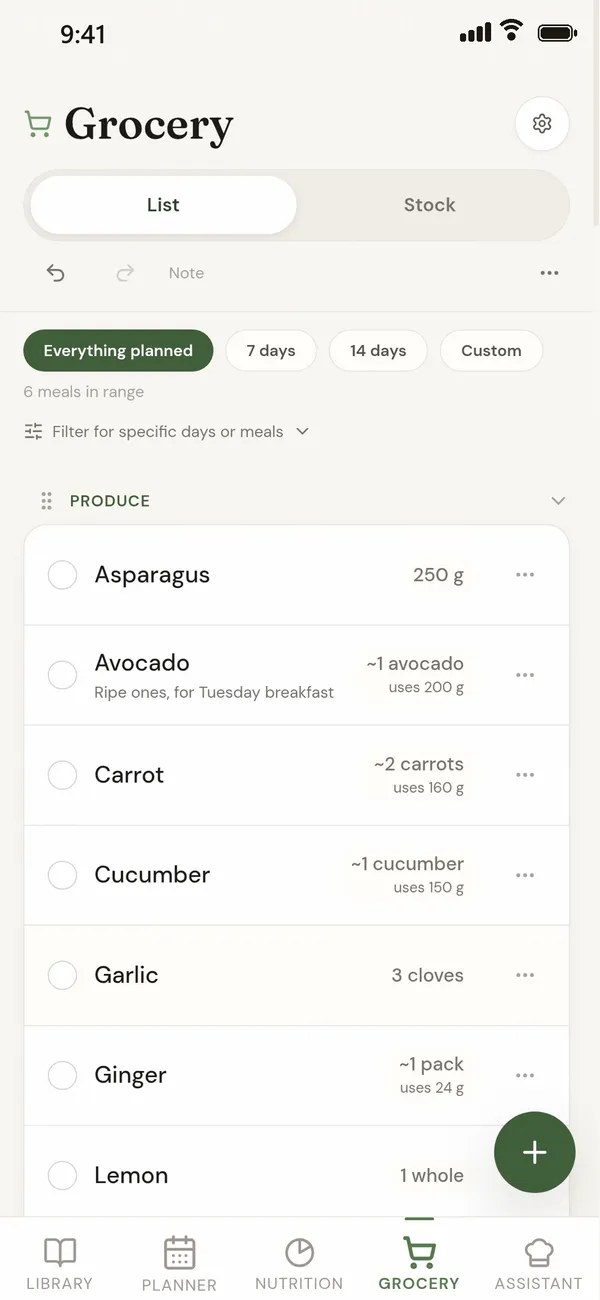
In a quiet counter the grocery list is made from the meals on your plan: put a recipe on a day and its ingredients are added, take it off and they go. Everyone in a household sees the same list on their own phone, and an item ticked in the shop is ticked for everyone.
The list is free. Sharing it with a household comes with a quiet counter plus.
How does the list build itself?
- From the plan. Every ingredient of every planned meal is added: the whole recipe by default, or scaled to the people eating when you switch on Scale for that meal.
- Added together. Two recipes that each use a lemon become one line for two lemons. Open an item to see which meals it is for.
- Grouped by aisle. Produce, dairy, pantry and so on, so you walk the shop once.
- For the days you choose. Everything planned, the next 7 or 14 days, or a custom range.
- With your own items. Add anything else by hand, or paste a list.
If you keep track of your freezer in the app, the list marks the things you already have frozen instead of asking you to buy them again. Fridge and pantry items are not taken off the list.
How do we share it?
Make a household (Profile, Household, then share your code with the other person). From then on the plan and the list are the same for both of you, and a tick on one phone shows on the other. One a quiet counter plus subscription covers the household. The full steps are in the meal planner for two guide.
What if I only want a shopping list?
If you do not plan meals and only want a list you both add to, a plain list app such as AnyList, or a shared note, is simpler. a quiet counter suits people who plan meals, because the list comes from the plan.
Questions
Is there a grocery list app that builds the list from my meal plan?
Yes. In a quiet counter the grocery list is made from the meals you plan, with the same ingredient from different recipes added into one line and the list grouped by aisle. It is free.
Can two people tick off the same list?
Yes, in a shared household. Both phones show the same list, and an item ticked on one is ticked on the other. Sharing comes with a quiet counter plus.
Can I add things that are not in a recipe?
Yes. Add any item by hand, or paste a list of several at once.
Does it take out what I already have?
It marks items you already have in the freezer, if you keep track of your freezer in the app. It does not take fridge or pantry items off the list.
Can my AI assistant add to the list?
Yes. With a quiet counter plus you can connect Claude or ChatGPT, which can then read the list, add and remove items, and tick them off.
Related guides
Last checked 9 October 2026. If something here is wrong, tell us at [email protected].